

- How to Complete the Copyright Registration Procedure in India for Software and Online Content - August 30, 2026
- Provisional Patent Filing Process in India: Complete Guide to Costs, Forms and Deadlines - August 26, 2026
- Trademark Opposition Rules in India: Timeline & Evidence Filing - August 20, 2026
Cyber Crime Complaint for Instagram is the right path when a fake, impersonating, hacked, or abusive Instagram account is causing harm, fraud, harassment, or identity misuse. In this article, I’ll cover everything on one page: how to report the account inside Instagram, how to file a cyber crime complaint in India, what evidence to collect, and what to do after submission.
📑 Table of Contents
Cyber Crime Complaint for Instagram

A Cyber Crime Complaint for Instagram becomes necessary when someone uses your photos, name, or identity to create a fake profile, hacks your account, sends scam messages, blackmails you, or runs fraud through Instagram DMs. Instagram’s own reporting tools are useful for immediate action, but for serious cases, especially identity theft, financial fraud, or harassment, a cyber crime complaint gives you a stronger legal route. For Indian users, the National Cyber Crime Reporting Portal and local cyber cells are the main channels for escalation.
If the issue is limited to spam, abusive content, impersonation, or unauthorized login, start by reporting it directly within Instagram first. If the problem involves money loss, threats, stalking, extortion, or repeated impersonation, file the complaint with government authorities as well. That combination gives you the best chance of removal and investigation.
When to report
1. Fake Instagram Account
A fake Instagram account is using your name, photos, business logo, or personal details.
2. Hacked Instagram Account
Your account has been hacked and you cannot access it.
3. Threatening or Abusive Messages
Someone is sending threatening, abusive, or obscene messages from an Instagram profile.
4. Instagram Scam
A scammer is using Instagram to ask for money, OTPs, gift cards, or personal data.
5. Impersonation
Someone is pretending to be your brand, business, or public identity.
6. Misuse of Private Content
Your private photos, chats, or sensitive content are being misused or shared without consent.
In simple terms, report anything that looks like identity theft, fraud, harassment, stalking, or digital abuse. If you wait too long, the fake account may change names, delete evidence, or scam more people. Acting quickly makes the complaint stronger and easier to verify.
Report inside Instagram
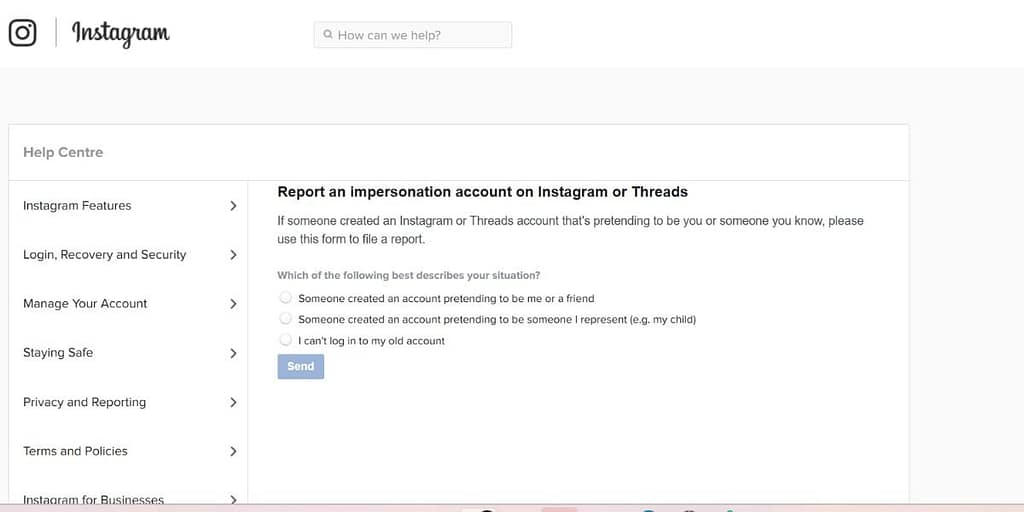
Before filing a formal complaint, report the profile or content directly in Instagram. This is useful because Instagram can sometimes remove fake or abusive accounts faster than a legal process. To do this, open the fake profile or the post/message, tap the three dots, and choose Report. Then select the reason that best matches the issue, such as impersonation, spam, harassment, or unauthorized access.
If your own account is hacked, use Instagram’s help and recovery options through the app or help center. Save screenshots of everything before reporting, especially the username, profile link, messages, and any suspicious story or post. Even if Instagram responds, keep your evidence because you may still need it for the cyber crime portal or police complaint.
File the complaint online
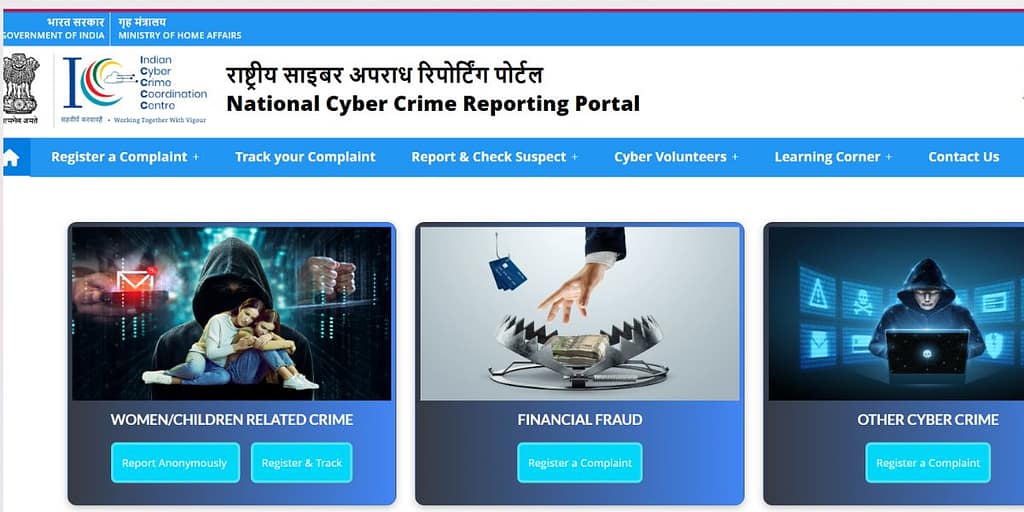
For India, the official route for a Cyber Crime Complaint for Instagram is the National Cyber Crime Reporting Portal. Choose the option for reporting cyber crimes, then select the category related to social media, impersonation, harassment, or fraud. Fill in your name, mobile number, email, address, state, and district, then describe the incident clearly and truthfully.
1. Instagram Username or Profile Link
Include the Instagram username or profile link related to your complaint.
2. Date and Time of the Incident
Mention the date and approximate time when the incident occurred.
3. Description of the Incident
Explain what happened in simple and clear language.
4. Screenshots
Attach screenshots of the fake profile, chats, or scam messages as evidence.
5. Transaction Proof
Provide any transaction proof if money was involved.
6. Your Instagram Handle
Include your own Instagram handle if your account was hacked or copied.
After submission, save the acknowledgment or reference number. That number is important for follow-up and status tracking. Write the complaint in a calm, factual tone and avoid emotional language, because clear facts are easier for investigators to understand.
Offline complaint option

If you prefer, you can also file a Cyber Crime Complaint for Instagram at your nearest cyber crime cell or police station. This is especially useful if the matter is urgent, involves blackmail, financial loss, or repeated harassment. Carry a printed copy of your complaint, government ID, screenshots, Instagram profile links, and any supporting records such as bank transaction details or chat exports.
Ask for written acknowledgment after you submit the complaint. If the officer advises you to register an FIR or a formal cyber complaint, follow that process and keep copies of all documents. For sensitive cases, offline filing can be a helpful backup even if you have already submitted the complaint online.
Also Read: Supreme Court on AI & Privacy – Explained Simply
Evidence checklist
A strong Cyber Crime Complaint for Instagram depends on evidence. The better your proof, the easier it is for authorities to verify the issue. Do not delete chats, block the account before saving screenshots, or edit evidence in a way that changes details.
1. Screenshot the Fake Profile
Screenshot the fake profile page, including the username and bio.
2. Capture Messages or Posts
Capture the messages, comments, stories, or posts involved.
3. Save the Profile URL
Save the profile URL or copy the account link.
4. Keep Date and Time Visible
Keep date and time visible wherever possible.
5. Save Payment Receipts
Save payment receipts if any money was sent.
6. Record Device Alerts
Record device alerts or login notifications if your account was hacked.
7. Preserve Instagram Emails
Preserve emails from Instagram about login attempts or password changes.
A good practice is to keep one folder with all files arranged by date. This makes it easier to explain the case to support teams, police, or cyber cell officers.
What to do next
After filing the complaint, follow up regularly using the acknowledgment number. If the fake account is still active, keep taking fresh screenshots so you can show ongoing harm. If Instagram or authorities ask for more details, reply quickly and provide only accurate information.
Also secure your own account immediately. Change your password, turn on two-factor authentication, review login activity, remove suspicious third-party apps, and update your email and phone number. If the account was hacked, log out of all devices and check whether your recovery email has been changed.
FAQs
What is the fastest way to report a fake Instagram account?
The fastest first step is to report the profile directly inside Instagram using the Report option. If the fake account is serious or harmful, submit a Cyber Crime Complaint for Instagram through the official portal as well.
Can I complain if my Instagram account is hacked?
Yes. A hacked account is one of the most valid reasons to file a Cyber Crime Complaint for Instagram. Save proof of unauthorized access and report it to Instagram and the cyber crime portal together.
Do I need evidence for the complaint?
Yes. Screenshots, profile links, messages, and payment proof make the complaint much stronger. Without evidence, action may be slower or less effective.
Is reporting inside Instagram enough?
For minor cases, it may be enough. For impersonation, fraud, threats, or hacking, you should also file a formal complaint with cyber authorities.
Can I report my Instagram account to cyber crime?
Yes, you can file a Cyber Crime Complaint for Instagram if your account is hacked, impersonated, misused, or used for fraud, harassment, or identity theft. For India, the official route is the National Cyber Crime Reporting Portal, and you should also report the issue inside Instagram itself for faster platform-level action.instagram+1
How can I file a complaint to Instagram?
You can file a complaint inside Instagram by opening the suspicious post, profile, or message, tapping the three dots, and selecting Report. Instagram also recommends using the report option near the content itself, especially for spam or abusive content.
What is the number for Instagram cyber crime?
There is no official “Instagram cyber crime number” specifically for Instagram issues. In India, for cybercrime complaints, users should use the National Cyber Crime Reporting Portal, and for financial fraud, the 1930 helpline is commonly used for urgent reporting.
Can cyber crime recover an Instagram account?
Cyber crime authorities may help investigate hacking, impersonation, or fraud related to an Instagram account, but they do not directly log you back into Instagram. Account recovery usually starts with Instagram’s own hacked account or support process, while the cyber complaint helps with legal action and investigation.
Sample complaint format
1. Your Name and Contact Details
Provide your full name and contact details.
2. Your Instagram Username
Mention your Instagram username.
3. Fake or Hacked Account Details
Provide the fake or hacked account username and profile link.
4. Description of the Issue
Briefly describe the issue in simple and clear language.
5. Date of the Incident
Mention the date when the issue started.
6. Evidence Attached
Attach all relevant evidence supporting your complaint.
7. Impact Caused
Explain the impact caused, such as harassment, identity misuse, or financial loss.
8. Request for Action
Request removal of the account, investigation, and appropriate action. Keep it simple and direct so the issue is easy to understand on the first reading.
Before submitting your Cyber Crime Complaint for Instagram, make sure you have the fake account link, screenshots, your ID proof if required, a clear written description, and a saved reference number. Report the account inside Instagram, file the cyber complaint, secure your account, and keep following up until the issue is addressed. For fake, hacked, or impersonating accounts, speed and documentation matter more than anything else.
Discover more from EcoLaw
Subscribe to get the latest posts sent to your email.